How to hire a WooCommerce to Shopify migration expert: who to pick, 12 questions to ask, and the red flags
For most small and mid-sized stores, the best person to move a WooCommerce store to Shopify is a fixed-price migration specialist who knows WordPress well. Expect to pay from about $1,500 for the whole job. Gig sellers are cheaper but usually just run a migration app. Agencies charge $5,000 to $25,000 or more and make sense for large catalogues, custom builds and ERP integrations. Whoever you pick, get a written fixed price that names every part of the job: data, theme, plugin replacements, 301 redirects, payments, test orders, the domain switch and support after launch.
Search for help moving a WooCommerce store to Shopify and you'll find thousands of people offering to do it. There are $90 gigs, Upwork profiles, Shopify Partners, and agency lists where every agency somehow ranks itself first. They all say "migration", and they don't all mean the same job.
I've built WordPress sites since 2016, and moving WooCommerce stores to Shopify is now the only thing I sell. I also know how a rushed migration tends to go wrong: redirects missing, order history left behind, and customers emailing to ask why their account vanished. This guide is what I'd tell a friend before they hired anyone, me included.
Who does WooCommerce to Shopify migrations?
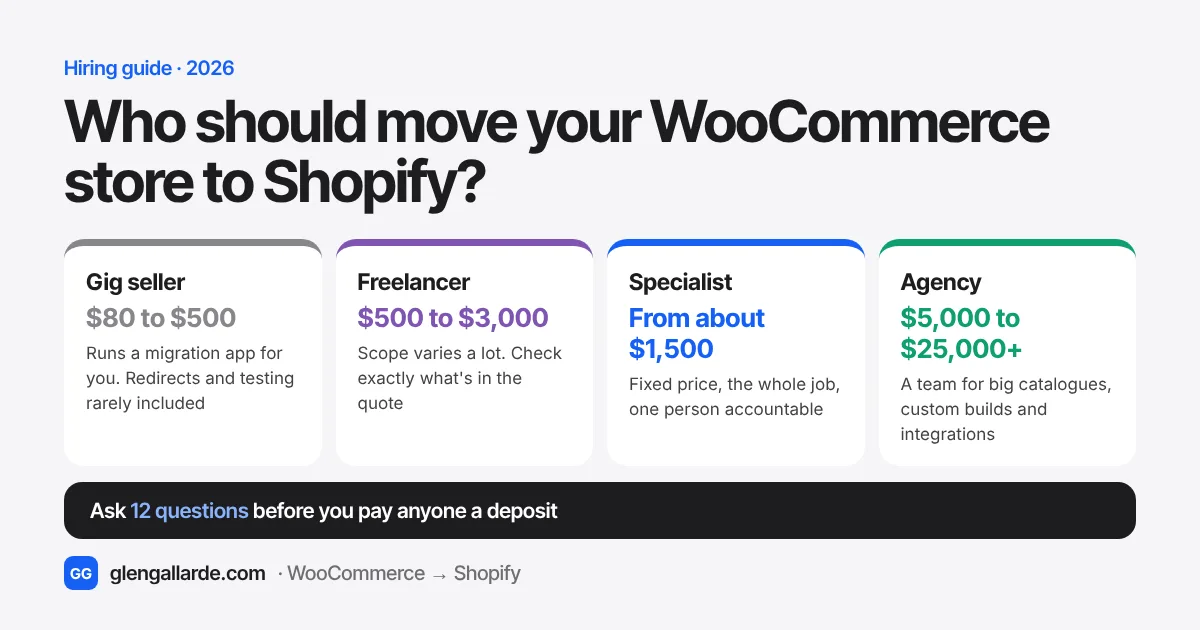
There are four kinds of people you can hire. The prices below are typical 2026 ranges from published price lists, marketplace gigs and agency guides, for a store with up to a few thousand products.
| Typical price | Who you talk to | What's usually included | Best for | |
|---|---|---|---|---|
| Gig seller (Fiverr and similar) | $80 to $500 | The seller, through the marketplace | Products and customers copied with a migration app. Redirects, design and testing are rarely included | Very small, simple stores on a tight budget |
| General freelancer (Upwork and similar) | $500 to $3,000 | The freelancer | Varies a lot. Some do the whole job, some only the data | Owners who can write a clear scope and check the work |
| Fixed-price migration specialist | From about $1,500 | The person doing the work | The whole move: data, theme, plugin replacements, redirects, payments, test orders, launch and fixes after | Most stores with real sales |
| Agency or Shopify Partner agency | $5,000 to $25,000+ | An account or project manager | Everything, often with custom design, strategy and ongoing marketing | Large catalogues, custom builds, ERP and warehouse integrations |
A migration app on its own is a fifth option if you'd rather do it yourself. Migration app, DIY or hire someone? covers that choice, and the migration cost guide breaks the prices down further.
Which one fits your store?
The right choice depends less on how many products you have and more on how much a bad launch would cost you.
- Under 100 products, a side business, few orders a week. A good gig seller or a migration app can work, as long as you handle the redirects yourself. The free redirect generator builds the file for you.
- The store pays the bills, up to a few thousand products. A fixed-price specialist. You want one person accountable for every product, order, redirect and test order, without paying for an agency's team.
- Subscriptions, wholesale pricing, custom product options or bookings. A specialist or agency that has moved these exact features before. Ask for specifics, not "we've done complex stores".
- ERP, warehouse or multi-store setups, or a full rebrand. An agency. That's what their project managers and bigger teams are for.
What a WooCommerce to Shopify migration must include
This is the list I'd hold every quote against, mine included. If a line is missing from the quote, ask whether it's included. If it isn't, ask who does it and what it costs.
- Products, variants, images and stock. Shopify allows up to 2,048 variants and 3 options per product, such as size, colour and material. Products with a fourth option need restructuring before the move.
- Categories rebuilt as collections, with the same descriptions and SEO titles.
- Customers and order history. Past orders can't be imported with Shopify's CSV files, so ask how they'll move them.
- Pages, blog posts and product reviews.
- A 301 redirect for every old URL, including products, categories, blog posts and pages. This is what protects your Google rankings. See how to migrate without losing SEO.
- Each plugin replaced with a Shopify app, a built-in feature or custom code. The plugin to app finder shows what replaces yours.
- A Shopify theme set up and styled to your brand, or a custom design if that's what you're paying for.
- Payments, shipping and taxes set up for the countries you sell to.
- Tracking and email reconnected: Google Analytics, ad pixels, your email platform and abandoned-cart emails.
- Customer sign-in tested and explained. Since February 2026, Shopify customers sign in with their email and a one-time code. There are no passwords to move and no activation emails to send. Your customers still need a short "we've moved" email, so nobody's confused. More on customer passwords.
- Test orders and the domain switch, with your WooCommerce store selling until Shopify is ready.
- Fixes and ranking checks after launch, for a set number of days, in writing.
12 questions to ask before you hire anyone
Send the same questions to everyone you're considering. How quickly and plainly they answer tells you nearly as much as what they say.
About the job
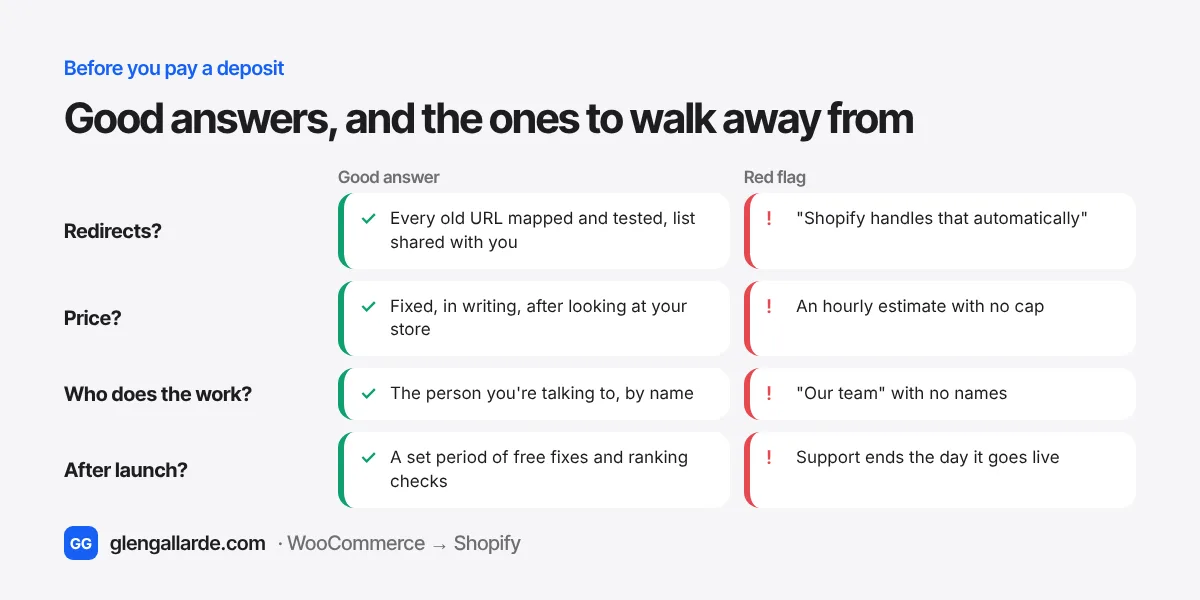
- "Have you moved WooCommerce stores before, and what went wrong on one of them?" Everyone has had a migration go sideways somewhere. A good answer names the problem and how they fixed it. "Nothing ever goes wrong" is not a good answer.
- "Is this a fixed price, and what exactly does it include?" You want a written price, given after they've looked at your store, that lists the scope above. Hourly work with no cap is how a $1,500 job becomes $4,000.
- "How will you handle my redirects, and will I get the list?" Every old URL should be mapped to its new address and checked after launch. You should get a copy of the redirect list.
- "Which of my plugins don't have a direct Shopify replacement?" Someone who has looked at your store can name them. Subscriptions, bookings, product add-ons and custom checkout fields are the usual ones.
- "Will my order history and reviews move?" The answer should be yes for both, and they should say how.
- "What happens to my customers' accounts?" The right answer in 2026: customers keep their order history and sign in with a one-time code sent to their email. If someone tells you every customer will get an activation email or needs a new password, their knowledge is out of date.
About launch day
- "Does my WooCommerce store keep selling during the move?" It should. The new store is built and tested alongside the old one, and only the domain switches on launch day.
- "What's your plan if something breaks after launch?" Look for a clear answer, such as pointing the domain back to WooCommerce while the problem is fixed.
- "Will you place test orders before launch?" Real test orders with your actual payment, shipping and tax settings, then refunded. This catches most launch-day disasters.
About working together
- "Who will actually do the work?" Get a name. With agencies and some freelancers, the person who sells the job isn't the person who builds it.
- "What support do I get after launch, and for how long?" Thirty days of fixes is a common standard. Support that ends at go-live is a warning sign.
- "How do I pay?" Milestone payments, such as half to start and half at launch, are normal. Paying everything up front isn't, and neither is moving payment off a marketplace that protects you.
Red flags: when to walk away
- A price before anyone has looked at your store. A quote that ignores your plugins, catalogue size and order history is a guess, and guesses get "revised" halfway through.
- "Shopify does redirects automatically." Shopify only creates a redirect automatically when you change a URL inside Shopify. URLs from your old WooCommerce store need to be mapped and imported. How Shopify redirects really work.
- Promises to keep your exact URLs. Shopify uses fixed paths such as /products/ and /collections/, so most WooCommerce URLs will change. Redirects handle it. Anyone promising identical URLs either doesn't know Shopify or is planning something fragile.
- A guaranteed ranking or traffic number. Nobody controls Google. A small dip for two to three weeks while Google recrawls is normal, even when everything is done right.
- No mention of testing. If the plan goes straight from "data imported" to "domain switched", the testing is going to be done by your customers.
- Asking for your WordPress admin password before you've agreed anything. For a quote, your store URL and a plugin list are enough. Give access once you've signed, using a separate account you can delete afterwards.
- Reviews you can't check. Marketplace reviews and Clutch reviews are tied to real jobs. Testimonials with first names only and no way to verify them count for much less.
Where to find a WooCommerce to Shopify migration expert
- The Shopify Partner Directory. Shopify's own list of agencies and freelancers, filterable by service. Partner tiers reflect how much business a partner does on Shopify, not how well they know WooCommerce, so still ask the questions above. Shopify's own advice says the same: credentials are useful, but not enough on their own.
- Upwork. Look for "Top Rated" or "Top Rated Plus" badges, a high Job Success Score and reviews that mention migrations specifically. Upwork holds your payment in escrow until each milestone is done.
- Clutch. Reviews are collected by Clutch through interviews or verified forms, so they're harder to fake. Mostly agencies and larger studios.
- Specialist websites. Specialists who publish their prices and process, like this one, let you check how they think before you get in touch.
- Someone you know. A store owner who has made the same move is the best reference there is. Ask what they'd do differently.
How to compare quotes fairly
Send everyone the same brief so the prices mean something:
- Your store URL.
- Roughly how many products, variants, customers and orders you have.
- A list of your active plugins. In WordPress, go to Plugins and copy the list.
- Anything unusual: subscriptions, memberships, wholesale prices, bookings, several languages.
- Whether you want your current design rebuilt as closely as possible or a fresh one.
- When you'd like to launch, and any busy season to avoid. How long a migration takes helps you plan around it.
Then put the quotes side by side against the 12-point scope list. The cheapest quote is often the one that leaves out redirects, testing and support after launch, and those are the parts that cost the most when they go wrong.
How I handle WooCommerce to Shopify migrations
Since you're reading this on my site, here's how I'd answer my own twelve questions, so you can compare.
I'm Glen Gallarde, a WooCommerce to Shopify migration specialist. I've built WordPress sites since 2016 and I'm Top Rated Plus on Upwork, with 100% Job Success across 127 jobs. Much of my migration work is white-label for agencies, so it carries their name, not mine.
- Price: my Full migration is a fixed price from $1,495 for stores with up to about 1,000 products. A migration with a redesign starts at $3,495. Stores with subscriptions or custom features are quoted after the audit. See what each package includes.
- Quote: send your store URL and you get a free audit, a plugin-by-plugin plan and a written fixed price within one business day.
- Who does the work: me. The person who quotes is the person who builds. There's no account manager in the middle.
- Launch: your WooCommerce store keeps selling until Shopify is tested and you've approved it. If launch day goes wrong, the old store goes back live.
- After launch: every old URL is redirected, I watch Search Console for 30 days, and fixes are free for 30 days.
- Payment: 50% to start and 50% at launch.
If I'm not the right fit, for example if you need an ERP integration or a big in-house team, I'll tell you in the audit.
Questions
Who is the best person to migrate WooCommerce to Shopify?
For most small and mid-sized stores, a fixed-price migration specialist with WordPress experience. They cost less than an agency and, unlike a migration app or a basic gig, they handle the redirects, plugin replacements, testing and launch. Agencies are the better fit for large catalogues, custom builds and ERP integrations.
How much does it cost to hire someone to migrate WooCommerce to Shopify?
In 2026, gig sellers charge about $80 to $500, general freelancers $500 to $3,000, fixed-price specialists from about $1,500, and agencies $5,000 to $25,000 or more. The price depends on how much of the job is included, so compare what each quote covers, not just the number.
Should I hire a freelancer or an agency for a Shopify migration?
Hire a freelancer or specialist if your store has up to a few thousand products and standard features, and you want to work directly with the person doing the job. Hire an agency if you need custom development, integrations with an ERP or warehouse system, several stores, or a team for ongoing marketing.
What questions should I ask a Shopify migration expert?
Ask whether the price is fixed and what it includes, how redirects will be handled, which plugins have no direct Shopify replacement, whether order history and reviews move, what happens to customer accounts, whether the old store keeps selling, who actually does the work, and what support you get after launch.
Do I need a Shopify Partner to migrate my store?
No. Anyone with access to your store can migrate it. Shopify Partner status shows someone works with Shopify regularly, but it doesn't prove WooCommerce knowledge. Check their migration experience and reviews either way.
Is it worth paying an expert instead of using a migration app?
If the store is your income, usually yes. Apps copy products, customers and orders, but they leave the theme, plugin replacements, redirects, payments, tracking, testing and domain switch to you. Missed redirects alone can cost months of Google traffic.
How long does a hired WooCommerce to Shopify migration take?
A small store usually takes about two weeks from the start of work to launch. Larger stores, subscriptions and custom designs take longer. Your old store keeps selling the whole time.
Will my customers need to reset their passwords after the move?
No. Since February 2026, Shopify customers sign in with their email address and a one-time code, so there are no passwords to reset and no activation emails. A short email telling customers about the move is still a good idea.
Sources
- Shopify Enterprise blog, Best Shopify partner for migration: 2026 guide (evaluation criteria; partner credentials as one signal among several; 23 April 2026)
- Shopify changelog, Legacy customer accounts are now deprecated (26 February 2026)
- Shopify developer changelog, The product variant limit is now 2048 for all merchants
- Ringly, How to choose a Shopify migration partner (price ranges by partner type)
- Presta, Best agencies for WooCommerce to Shopify migration 2026 (agency price bands)
- Shopify Community, Migration from WooCommerce to Shopify (a store owner asking for a trusted partner)