WooCommerce vs Shopify in 2026: an honest comparison
Shopify is the better pick for most store owners who want to sell, not run a website: hosting, security, speed and checkout are handled for one monthly price. WooCommerce is the better pick if you need full control of the code, already have a developer you trust, or your business is built around content. Neither is "best". The right one is the one that costs you the least time and money to run well.
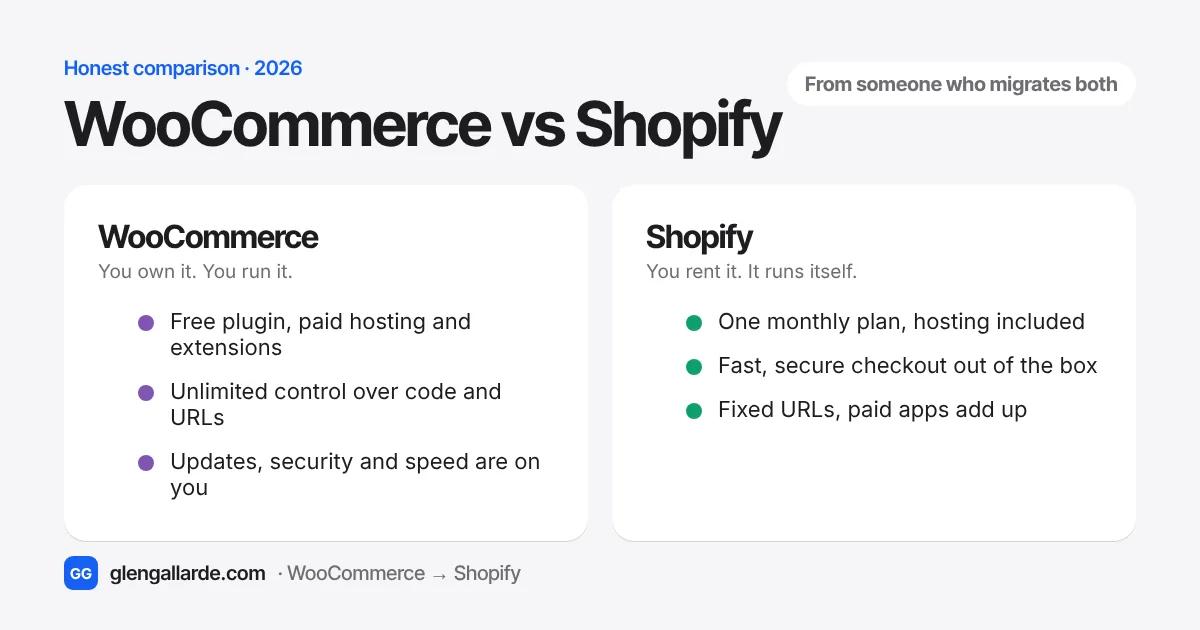
Most WooCommerce vs Shopify comparisons are written by companies that sell one of the two. A hosting company tells you WooCommerce is better. A Shopify app maker tells you Shopify is. I've built WordPress sites since 2016, and these days I move stores from WooCommerce to Shopify for a living. That means I'm biased too, so I'll be upfront about where WooCommerce wins. It wins more often than you'd think.
What I see every week is the same pattern. Store owners don't leave WooCommerce because it can't do something. They leave because keeping it running quietly eats their evenings: a plugin update breaks checkout, the host emails about a security patch, pages get slower every year. If that doesn't sound like you, you might be fine where you are.
WooCommerce vs Shopify at a glance
| WooCommerce | Shopify | |
|---|---|---|
| What it is | A free plugin that turns a WordPress site into a store | A hosted store platform you pay for monthly |
| Starting cost | $0 for the plugin, plus hosting, theme and paid extensions | $39 a month on Basic ($29 if paid yearly) |
| Hosting and security | Your job (or your host's and developer's) | Included |
| Updates | WordPress, theme and every plugin, on you | Automatic |
| Payment fees | Whatever your payment provider charges | Shopify Payments rates, or an extra 0.6% to 2% per sale with another provider |
| Flexibility | Almost unlimited, if you can code it | Large app store, but some limits you can't change |
| URLs | You choose the structure | Fixed: /products/, /collections/, /pages/ |
| Best for | Content-led stores, custom builds, owners with a developer | Owners who want to sell, not maintain a website |
Which is cheaper, WooCommerce or Shopify?
WooCommerce looks cheaper because the plugin is free. It usually isn't free to run. A store that takes real orders needs decent hosting, a handful of paid extensions (most cost $50 to $300 a year each), a premium theme, backups, a security plugin, and someone to fix things when an update goes wrong.
Shopify is the opposite. The price is on the box, and the extras come from apps. Here's how they compare for a typical small store doing a few hundred orders a month. These are typical monthly ranges I see in audits, before card fees, not quotes:
| Monthly cost | WooCommerce | Shopify (Basic or Grow) |
|---|---|---|
| Platform or hosting | $25 to $100 for managed WooCommerce hosting | $39 to $105 for the plan (less if paid yearly) |
| Theme | $0 to $10 (yearly licence, spread out) | $0 for a free theme, or a one-off $200 to $400 |
| Extensions or apps | $15 to $60 (yearly licences, spread out) | $20 to $100 in monthly apps |
| Security and backups | $0 to $30 | Included |
| Developer upkeep | $0 to $300, and it's lumpy | Usually $0 most months |
The line that decides it for most stores is the last one. On WooCommerce, the cost of a broken update isn't on any invoice. It's the afternoon you lose, and the orders that don't come in while checkout is down.
The fee nobody mentions: if you use Shopify with a payment provider other than Shopify Payments, Shopify adds its own fee on every sale: 2% on Basic, 1% on Grow and 0.6% on Advanced. On $20,000 a month in sales, that's $400 a month on Basic. Using Shopify Payments removes it.
How much does Shopify take from a $20 sale?
On the Basic plan with Shopify Payments, for an online card payment in the US, Shopify charges 2.9% plus 30 cents. On a $20 sale that's 88 cents, and you keep $19.12. Stripe or PayPal on WooCommerce charge a similar rate, so card fees are roughly a wash. The real difference is the monthly plan against your hosting, plugins and upkeep.
Want your own numbers? The free WooCommerce vs Shopify cost calculator compares the two side by side using your sales, hosting and plugin costs.
Shopify prices are for the US as of November 2026 and vary by country. Check shopify.com/pricing for yours.
Which is easier to run day to day?
Shopify, and it isn't close. There's nothing to update, nothing to patch and no server to watch. You log in, add products, ship orders. When something breaks, it's usually an app, and you can switch it off.
WooCommerce isn't hard to use once it's set up. The admin is familiar if you've used WordPress. The work is in keeping it healthy: WordPress core, your theme and every plugin update on their own schedules, and each one can clash with another. Most of the owners I talk to don't mind the dashboard. They mind the Tuesday morning when a routine update takes the cart down.
Which is faster?
Out of the box, Shopify is faster for most stores, because every store runs on Shopify's own servers and global network. A WooCommerce store is only as fast as its hosting, theme and plugins, and those tend to get heavier every year.
That said, a well-built WooCommerce site on good hosting is quick, and a Shopify store stuffed with apps can be slow. Each app can add its own scripts to every page. Speed on either platform is mostly about discipline. Shopify just makes the default better.
Which is better for SEO?
Both rank well. I've seen stores on each platform sitting on page one. The differences are smaller than most articles make out:
- WooCommerce gives you full control: any URL structure, any schema, Yoast or Rank Math, and WordPress is still the best blogging tool there is. If your sales come from content, that matters.
- Shopify handles the basics for you: sitemaps, canonical tags, clean product pages and fast load times. You can edit titles, descriptions and even
robots.txt. What you can't change is the URL structure. Products always live under/products/and categories under/collections/.
The biggest SEO risk isn't either platform. It's moving between them without redirecting every old URL. That's how stores lose traffic. If you do switch, read how Shopify 301 redirects work and the SEO migration guide first.
Which is more secure?
Shopify, for most owners. Shopify is PCI DSS Level 1 compliant, runs the servers, patches them and protects checkout. You can't install code on the server, which is limiting, but it also means there's no server for anyone else to break into.
WooCommerce itself is well maintained. The risk comes from everything around it: an outdated plugin, a nulled theme, a host running an old PHP version. Every plugin is another door. That's why the October 2026 PHP vulnerability had WooCommerce owners scrambling while Shopify owners didn't have to do anything.
Which is more flexible?
WooCommerce. You own the code, so if a developer can build it, you can have it: custom checkout logic, unusual product types, deep integrations with your own systems.
Shopify covers most needs through its app store and settings, but it has a few hard limits worth knowing before you choose:
- 3 options per product (for example size, colour and material) and up to 2,048 variants. A lot of comparisons still quote the old 100-variant limit. That changed. The 3-option limit is the one that catches stores out.
- Fixed URL structure, as above.
- Checkout changes are limited unless you're on Shopify Plus.
- Some products aren't allowed on Shopify Payments, so check Shopify's acceptable use rules if you sell anything regulated.
If you're on WooCommerce now and wondering whether your plugins have a Shopify equivalent, paste your list into the free plugin to app finder.
The downsides of each, honestly
What are the downsides of WooCommerce?
- You're responsible for hosting, updates, backups and security, or for paying someone who is.
- Plugins conflict. The more you have, the more often an update breaks something.
- Speed depends on your hosting and tends to slip as the store grows.
- Costs are spread across many small bills, so they're easy to underestimate.
What are the downsides of Shopify?
- You pay every month, and apps add up. A store with ten paid apps can spend more on apps than on the plan.
- An extra fee per sale if you don't use Shopify Payments.
- Fixed URLs, the 3-option limit and limited checkout changes below Plus.
- You're renting. Your data exports as CSV files, but your theme and apps don't move anywhere else.
Which should you pick?
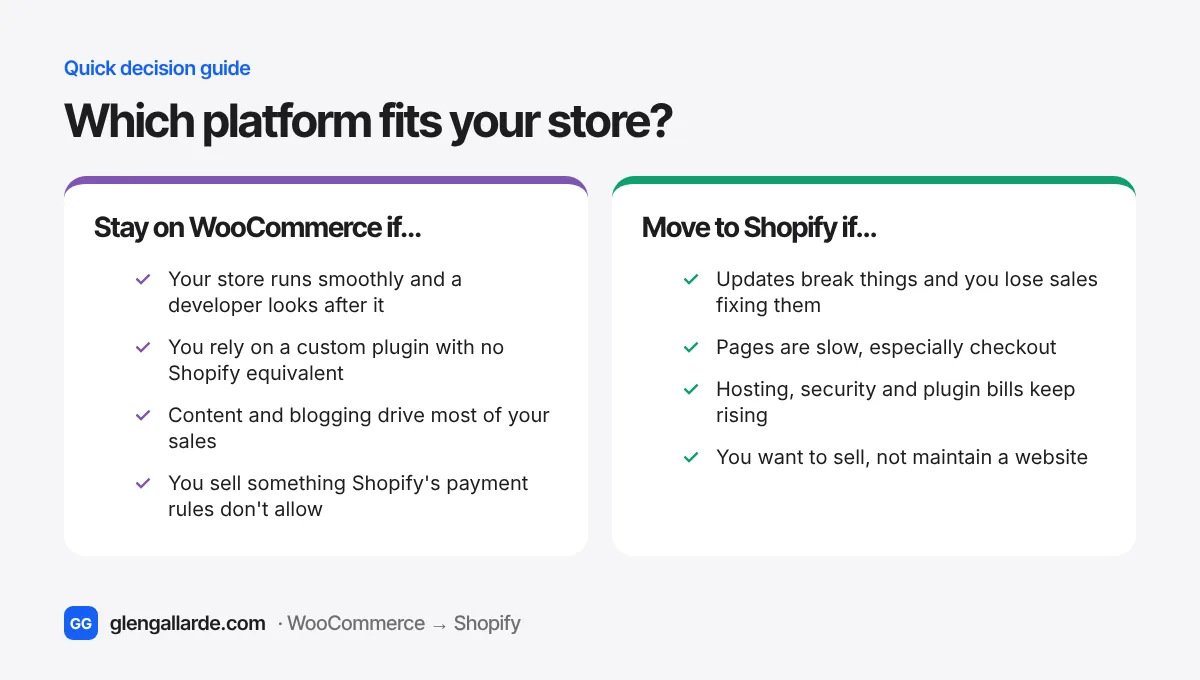
you're starting a new store, you don't have a developer on call, you'd rather spend your time on marketing and products, or your current site is slow and keeps breaking.
you need something custom that Shopify can't do, your business runs on content, you already have a reliable developer, or you sell products Shopify won't process payments for.
If you're starting from zero, I'd choose Shopify for almost any normal product store. You'll be selling sooner, and you won't need me or anyone else to keep it alive.
Already on WooCommerce? When switching pays off
Switching is a real project, so it should solve a real problem. It usually pays off when at least two of these are true: you've lost sales to a broken update in the last year, your pages load slowly on mobile, you're paying a developer every month just to keep things running, or you're nervous every time a security warning lands in your inbox.
If none of those apply, stay. A WooCommerce store that works is worth keeping. If a few of them do, the 7 signs it's time to move will help you decide, and the migration cost guide shows what the move itself costs.
Questions
Is WooCommerce free?
The plugin is free. Running a store on it isn't: you pay for hosting, a domain, usually a premium theme and several paid extensions, and someone's time to keep it updated. Most small stores spend somewhere between $50 and $300 a month all in.
Is Shopify good for beginners?
Yes. It's the easier of the two to start with, because there's nothing to install, host or update. You can have a working store in a day and add complexity later through apps.
Is Shopify more expensive than WooCommerce?
On paper, often. In practice, often not. Once you add WooCommerce hosting, paid plugins, security and developer time, many small stores pay about the same or more. The cost calculator will tell you for your store.
Should I use WordPress or Shopify?
If you mainly sell products, Shopify. If you mainly publish content and sell a little on the side, WordPress with WooCommerce. Some businesses keep a WordPress blog and run the store on Shopify, though one site is simpler for most.
Can I move from WooCommerce to Shopify without losing SEO?
Yes, if every old URL gets a 301 redirect, your titles and descriptions move over, and you watch Search Console for the first month. A small dip for 2 to 3 weeks is normal. See the SEO migration guide.
Can I move from Shopify back to WooCommerce?
Yes. Products, customers and orders export from Shopify as CSV files, and migration apps work in both directions. Your Shopify theme and apps don't come with you.